- First, ensure that your Best Practice Premier database is running the January 2024 data update as a minimum. For instructions from BP on how to check your current version, and apply BP updates, click here, or speak with your practice I.T. support.
- Next step is to provide permission to GoShare to access your BP database. From the BP main screen, select Setup > Configuration > Select
 (Database) icon on the left then select the button: ‘Setup third-party integrations.
 - In the list of BP silver integration partners, scroll down to check the box next to ‘GoShare Healthcare’, then click ‘Save’, then ‘Save’ again.
- Now let’s install GoShare PSI! – On a PC in the practice which has BP installed, browse to: www.healthily.com.au/gosharepsidownload
- Click ‘Install’
- Run the GoSharePSI.Windows.application file from your ‘Downloads’ folder
- As part of a standard Microsoft Windows security check, you will be displayed a ‘Security Warning’ similar to below screenshot. This is expected and you can click ‘Install’.
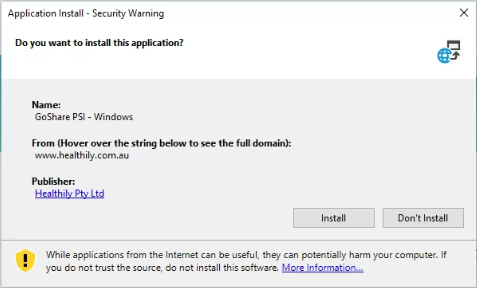 – Click ‘Install’
- Once the installer has run, you will be presented with the GoShare PSI log in on the right of your screen. To log in, you’ll need a GoShare account: Enter your email address and password you created upon accepting your invitation to create a GoShare account. Click here for instructions on gettings started with GoShare.