- The GoShare support team will provide you with the most up to date My Symptom Check-in filter / SQL query to run in Best Practice.
- Once you have presented your list to your doctors, Add to patient’s past history in BP Clinical record one of the following depending on requirement:
-
- My Symptom Check-in GP declined
– Use this as a manual override to exclude patients from the “eligible” patient search results.
My Symptom Check-in GP Invited
– Use this as a manual override to invite additional patients who fall outside the standard search criteria.
My Symptom Check-in patient declined
– Add this if a patient contacts the practice to request removal from future invites
My Symptom Check-in participating
– This is to be added only by the nurse during the first consultation with the patient.
- My Symptom Check-in GP declined
-
- Update: Per updated screenshot below, ensure all boxes circled are unticked to ensure that adding this note does not affect other functions in BP.
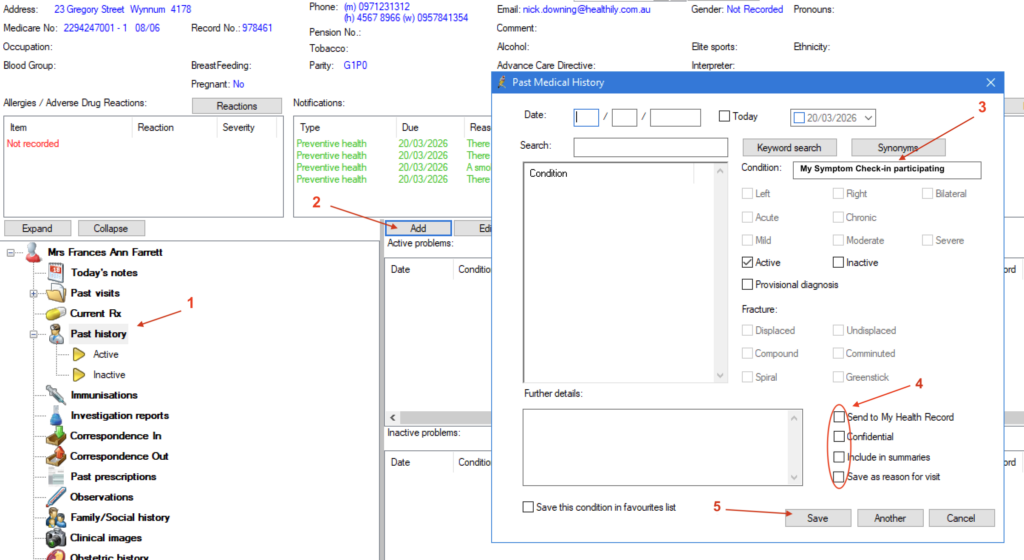
How to add to patient’s past history in BP Clinical record. Please ensure the text entered is exactly as above in bold text:
Prior to your online appointment with the Healthily / GoShare project team to complete your initial SMS/Email invitation to your patients list, ensure you have shared the ‘Staff Explainer’ with your reception team. Download PDF to print out below: